You can view the payoff quotes created by in the customer portal. To view the payoff quote, navigate to Contracts > Manage payoff quotes.
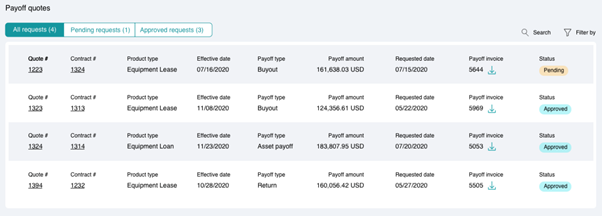
Using tabs, you can choose to view only Pending requests, Approved requests, or All requests.
For each payoff quote, you can view the following information:
| Quote # | Unique identifier of the quote. |
| Contract # | Unique identifier of the quote. |
| Product type | Manufacturer of the asset |
| Effective date | Effective date of payoff |
| Payoff type | Type of payoff |
| Payoff amount | Amount of payoff |
| Requested date | Requested date of payoff |
| Payoff invoice | Invoice of the payoff Quote # |
| Status | Shows if payoff quote is pending or approved |
Downloading
You can download the payoff invoice for a Quote # by clicking on corresponding to the Quote #