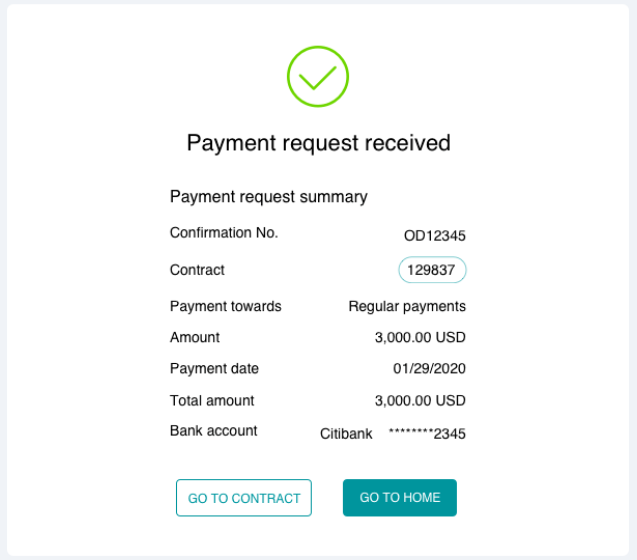
You can use the Customer Portal to record payments against pending invoices or contracts. To do this, navigate to Invoices & Payments > Make Payment.
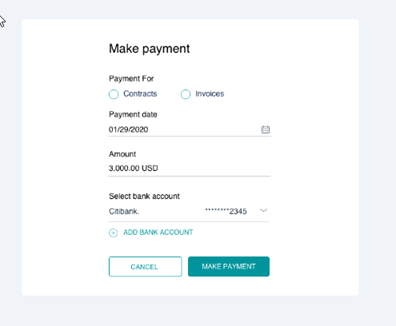
- Choose if you want to record the payment for Contracts or an Invoices.
- Based on your selection, select the required Contract(s) or Invoice(s) and click DONE. You can select multiple invoices/contracts.
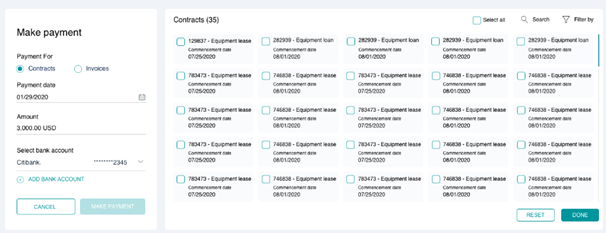
Searching and Filtering
You can use the Search or Filter By option to look for specific contracts/invoices, or even use the Select All option to select of the pending invoices/contracts.
- Select the Payment Date that should be noted for the payment along with the payable Amount.
- Next, select the applicable Bank Account for the payment. You can also choose the ADD BANK ACCOUNT option to create a new bank account and associate to this payment.
- With all details filled, click the MAKE PAYMENT button to save the payment details.