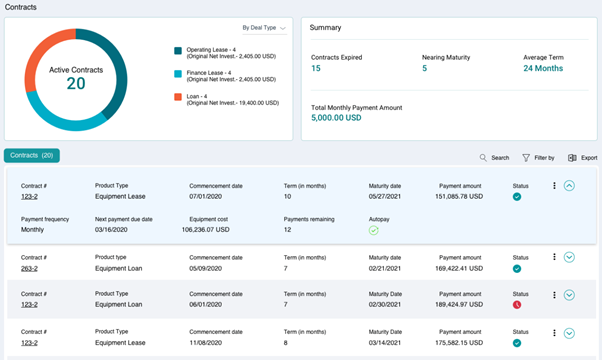
You can view the details of a contract from the Customer Portal. To do so, navigate to Contracts > View contracts. The View contracts module provides you a quick summary of all contracts as well as the details of an individual contract.
Searching, filtering and Exporting
You can use the Search or Filter By option to look for specific contracts applicable to you.
You can download the contracts details in an excel sheet by using the Export option.
The Dashboard provides you a quick summary of your contracts in the following manner:
- Overview: Provides you with a count of active contracts grouped by the type of contract
- Summary: Displays the count of the contracts, average term and total monthly payment amount.
- The
section provides the details of an individual contract including Product type, Commencement date, Maturity date, Status and so on. These details vary as per the Product type.
By clicking corresponding to the Contract #, you can view following information regarding the contracts:
- View Asset
- View payment schedule
- Manage documents.
- Manage custom fields
- Manage payoff
- Make payment
Following screenshot describes the fields on the Contracts page for product type as Equipment Lease.

To view all the details of a contract, expand the section by clicking .

You can also view the contract details by clicking corresponding to Contract # > View contract details. Following window appears on the right side of the dashboard.
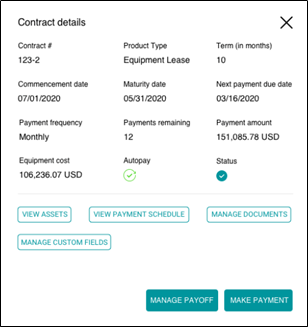
Following table describes the contract details for product type as Equipment Lease.
| Contract # | Unique identifier that identifies a contract. |
| Product Type | Type of product type – Loan or Lease. |
| Product type | Manufacturer of the asset. |
| Term (in months) | Duration of the lease in months, from Commencement Date to Maturity Date. |
| Maturity date | Date as of which the Lease matures. |
| Payment amount | Total amount to be paid. |
| Status | Status of contract – Pending or Approved. |
| Payment frequency | Periodicity at which you the interim charges would be billed. |
| Next payment due date | Amount of loan before interest. |
| Equipment cost | Amount charged over the principal balance. |
| Payments remaining | Number of payments remaining. |
| Autopay | Indicates if Autopay is enabled or not. |
Following screenshot describes the fields on the Contracts page for product type as Equipment Loan.

To view all the details of a loan contract, expand the section by clicking on .

You can also view the contract details by clicking corresponding to Contract # > View contract details. Following window will appear on the right side of the dashboard.
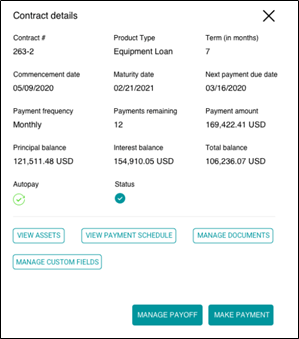
Following table describes the contract details for product type as Equipment Loan.
| Contract # | Unique identifier that identifies a contract. |
| Product Type | Type of product type – Loan or Lease. |
| Product type | Manufacturer of the asset. |
| Term (in months) | Duration of the lease in months, from Commencement Date to Maturity Date. |
| Maturity date | Date as of which the Lease matures. |
| Payment amount | Total amount to be paid. |
| Status | Status of contract – Pending or Approved. |
| Payment frequency | Periodicity at which you the interim charges would be billed. |
| Principal balance | Amount of loan before interest. |
| Interest balance | Amount charged over the principal balance. |
| Total balance | Total balance of the contract. |
| Payments remaining | Number of payments remaining. |
| Autopay | Indicates if Autopay is enabled or not. |