All payments made towards invoices or contracts can be viewed from one single place in the Customer Portal by navigating to Invoice & Payments > Payment History.
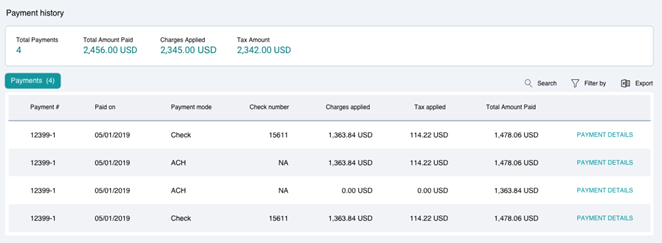
The Summary section of the Payment History module provides you with an overview of the number of payments that have been made by you, as well as the underlying amounts.
A detailed list of all the payments is available with the following information displayed for each payment:
| Payment # | |
| Paid On | |
| Payment Mode | |
| Check Number | |
| Changes Applied | |
| Tax Applied | |
| Total Amount Paid |
Searching and Filtering
You can use the Search or Filter By option to look for specific payments made by you.
Clicking on PAYMENT DETAILS opens a detailed view of the payment that additionally provides Application Details as follows:
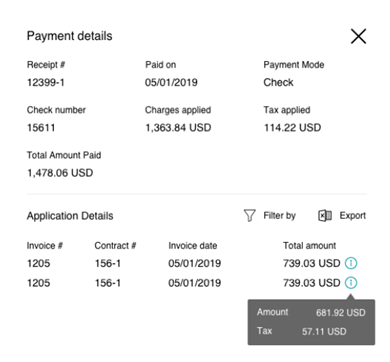
While the Application Details section displays the Total Amount for which the payment was made, hovering over the icon displays a breakup of the charges and taxes applicable.