We are here to help!
Viewing Asset Details
Who is this applicable to? Portal User, Portal Administrator, Super User
The Customer Portal facilitates viewing all the assets available to you. You can choose to view all the available assets or only view the assets associated with a contract. To do this, navigate to Assets > Assets.
The Assets dashboard provides you quick insights of all the available assets in the following manner:
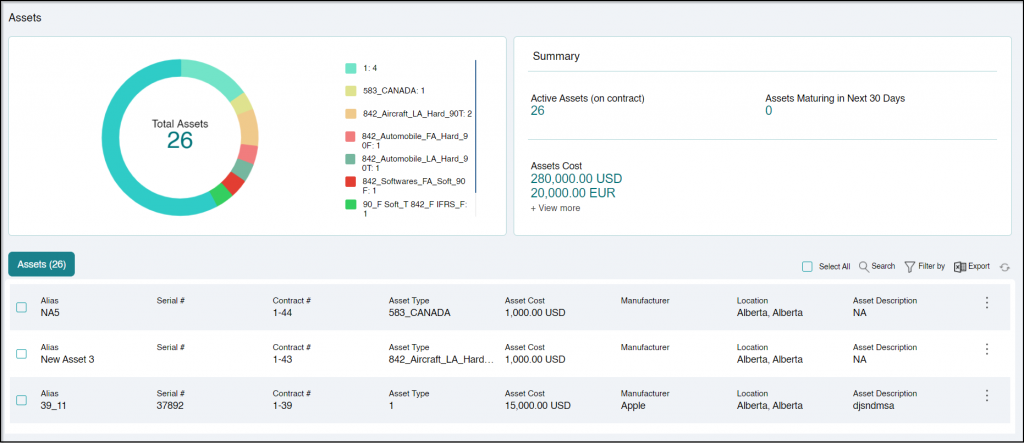
- Overview: Provides a count of total assets grouped by the type of asset.
- Summary: Displays the count of active, and maturing, and total Assets cost.
TIP
In case you have contracts in multiple currencies, you can view the asset cost in other currencies including UAD, CAD, JYP, USD and so on. Hover on +View More to view additional applicable currencies.
The Assets section provides you the details of an individual asset.
| Alias | Alias is an alternate name given to the asset for identification, which also serves as a secondary search option |
| Serial # | Unique identifier of the asset |
| Contract # | Unique identifier of the contract the asset is associated to |
| Asset Type | Type of asset |
| Asset Cost | Cost of the asset |
| Manufacturer | Manufacturer of the asset |
| Location | Location of the asset |
| Asset Description | Description of the asset. |
On clicking  corresponding to the Asset #, you can: