We are here to help!
Creating Organization Config
Who is this applicable to? Security Administrator
The Security Administrator role facilitates you to create organization configurations for your customers. Once the Organization Config is created, you can then create the users for these organizations.
To create Organization Config, perform the following steps.
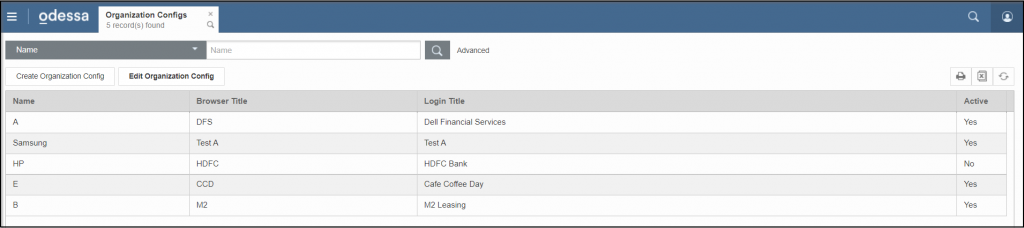
- From the menu pane on the left, navigate to User Management > Organization Configs > Organization Configs.
- Click Create Organization Configs.
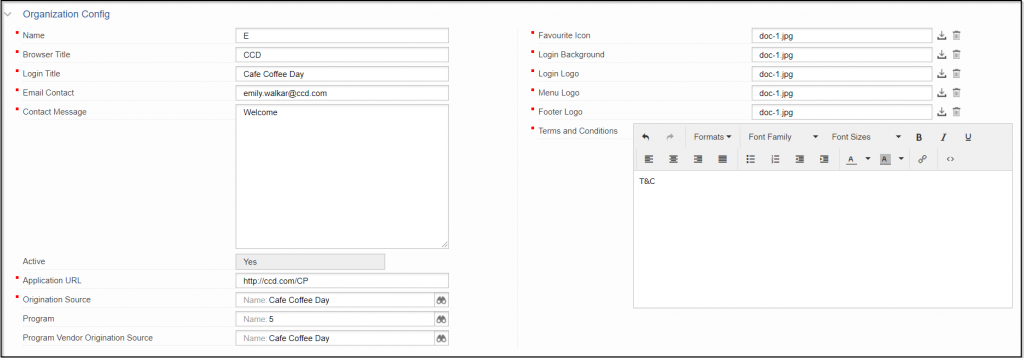
- Enter the following fields to customize the customer dashboard and login page:
- Name of the organization, followed by Browser Title, and Login Title.
- Enter the Email Contact, followed by Contact Message.
- Enter a unique Application URL.
- From the dropdown list, select Origination Source, Program and Program Vendor Origination Source as required by you.
- Upload the Favorite Icon, Login Background, Login Logo, Menu Logo, and Footer Logo.
- Enter the Terms and Conditions as required.
- Click
 at the bottom of the tab to create the Organization Config.
NOTE
In case of errors, you can choose to override the warnings by selecting the Override warnings checkbox at the bottom of the tab, and clicking Submit once again.
All configurations created can be viewed in the Organization Configs tab as follows: