To view the payment schedule for a contract, navigate to Contracts > View contracts.
Click corresponding to the contract > View payment schedule.
Navigate to Contracts > View contracts > Click corresponding to the Contract # > VIEW PAYMENT SCHEDULE.
OR
Navigate to Contracts > View contracts > Click corresponding to the Contract #> View contract details > VIEW PAYMENT SCHEDULE.
Following screenshot shows the details for payment schedule for equipment lease.
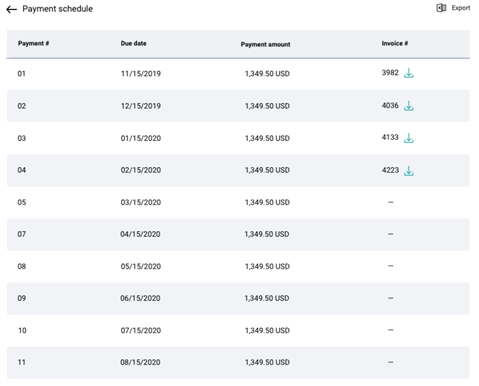
You can view the following information from the payment schedule:
| Payment # | Unique identifier of the payment. |
| Due Date | Date at which payment is due. |
| Payment amount | Amount to be paid |
| Invoice # | Unique identifier of the invoice. |
Downloading and Exporting
You can click the icon corresponding to an Invoice # to download the payment schedule for a particular month or use the Export option to download the whole payment schedule.
Navigate to Contracts > View contracts > Click corresponding to the Contract # > VIEW PAYMENT SCHEDULE.
OR
Navigate to Contracts > View contracts > Click corresponding to the Contract #> View contract details > VIEW PAYMENT SCHEDULE.
Following screenshot shows the details for payment schedule for equipment loan.
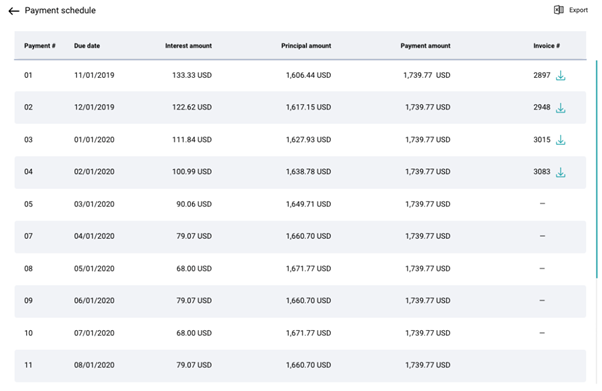
You can view the following information from the payment schedule:
| Payment # | Unique identifier of the payment. |
| Due Date | Date at which payment is due. |
| Interest amount | Interest to be paid on the principal amount |
| Principal amount | Amount borrowed on loan |
| Payment amount | Total amount to be paid (Interest amount + Principal amount) |
| Invoice # | Unique identifier of the invoice. |
Downloading and Exporting
You can click icon corresponding to an Invoice # to download the payment schedule for a particular month or use the Export option to download the whole payment schedule.