We are here to help!
Configuring Marketing Parameters
Who is this applicable to? Security Administrator
As Security Administrators, you can configure marketing parameters to show promotions or advertisements to your customers.
Perform the following steps to configure global marketing promotion parameters:
- From the main menu on the left, navigate to Business Admin > Master Configurations > Marketing Configs.
- In the Marketing Configs tab that opens, click
 .
. - Enter the Name for the config.
- Click
 to select the date from which the marketing content should be shown to your customers.
 - Optionally, enter a description for the marketing config.
- To make marketing config available to specific users, enter the pre-define stored procedure name starting with “U_” in the User Selection Query field. Click
 to verify if the entered query satisfies your requirements.

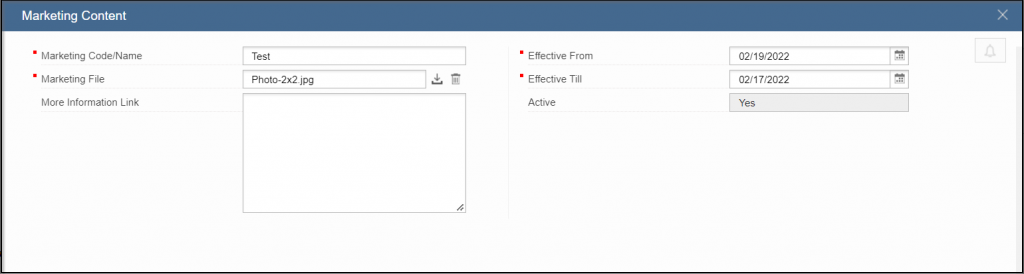
- In the Marketing Content section, click
 to add marketing content like photos, videos, flyers and so on.
 - Enter the Marketing Code/Name followed by selecting the photo/video to upload. Ensure that the selected photo/video is in 16:9 aspect ratio.
- The marketing content will be visible to your customers for a specific time period. Click
 to select the Effective From and Effective Till date of the marketing content.
- Click
 to save the marketing content.
 - Click
 to save the configured markeing parameters.