Viewing Contract Details
Who is this applicable to? Portal User, Portal Administrator, Super User
The Customer Portal allows you to view all your contracts in one single location, along with important details such as the term, the maturity date, payment frequency, and so on.
To view all the available contracts, navigate to Contracts > Contracts from the main menu header.
The Contracts module that opens consists of a Dashboard of all the contracts existing in the system, along with a detailed list of the said contracts.
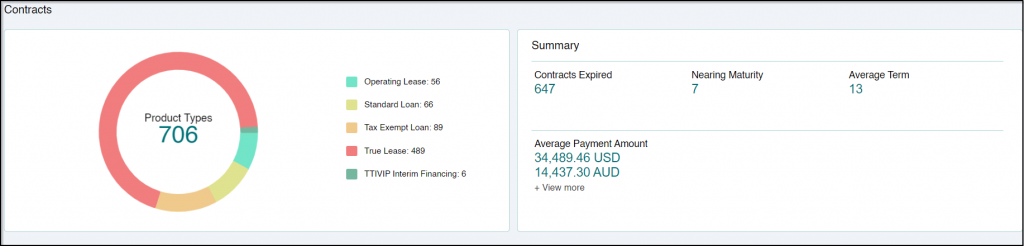
The Dashboard provides you a quick summary of your invoices in the following manner:
- Overview: Provides you with a count of Product Types applicable to you.
- Summary: Displays the number of contracts that have expired, contracts nearing maturity and average term of the contracts. The Summary also displays the total monthly amount paid.
TIP
In case you have contracts in multiple currencies, you can view the Average Payment Amount in other currencies including UAD, CAD, JYP, USD, and so on. Hover on +View More to view additional applicable currencies.
The Dashboard is followed by a list of all the contracts existing in the system along with relevant information including Product type, Commencement date, Maturity date, Status, and so on. These details vary as per the Product type.
The Dashboard is followed by a list of all the contracts existing in the system along with relevant information including Product type, Commencement date, Maturity date, Status, and so on. These details vary as per the Product type. Using  you can view the list of active and terminated contracts respectively.
Click the  arrow corresponding to the Contract # to expand and view all the available details of a contract.
Alternatively, you can also view the contract details by clicking
corresponding to the Contract #, followed by Contract Details. This opens Contract Details for Contract # window on the right.