We are here to help!
Requesting amendments
Who is this applicable to? Portal Administrator, Portal User, Super User
Using the Customer Portal, you can request your lessor to increase credit lines and/or to extend the expiry date for the credit lines.
Perform the following steps to raise the aforementioned requests to your lessor:
- In the Credit corner, click See All. This opens the Credit Lines panel on the right.
- Click
 corresponding to the Line # for which you want to request increase in Credit line.
Requesting an increase in Credit line
- Enter the New Credit Limit or Additional Amount required as required by you.
To know more about New Credit Limit or Additional Amount required, click here.
- New Credit Limit: – The new credit limit that should override the previous limit, subject to approval. The amount being requested should be greater than the originally approved amount.
- Additional Amount required: – Additional fund limit topping up the previous limit, subject to approval.
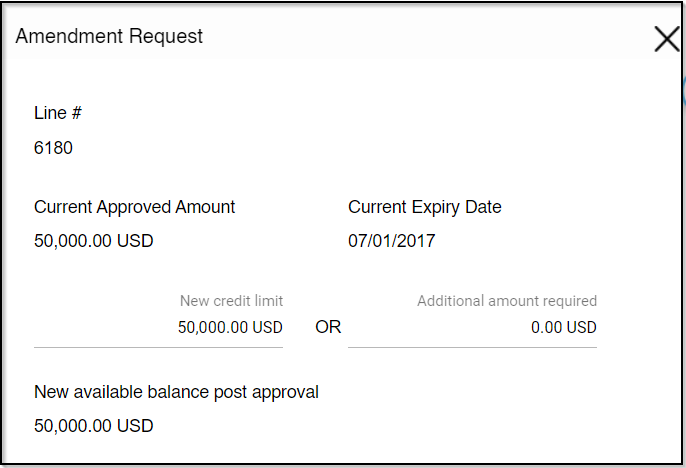
- Enter Comments for your lessor, if any.
- Click
 on the bottom right to submit your request.
Requesting expiry date extension
- Click
 to select the new Expiry date that you wish to have.
 - Enter Comments for your lessor, if any.
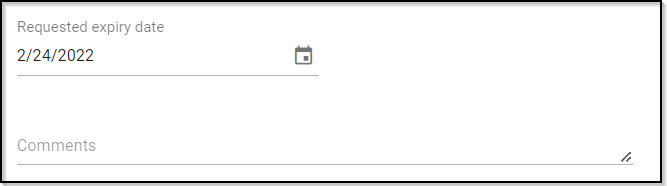
-
Click on the bottom right to submit your request.
Upon successfully creating the request, you would receive a confirmation message.